Upload. Queue. Print. Delete.
HandyPrintz replaces the old habit of sending personal documents through WhatsApp or email. Customers scan a QR code, upload their file, and it arrives in the shop's print queue — private, organized, and temporary.
Demo mode — files are temporary. Max 5 files, 5 MB each. No real printing.
Cannot scan the QR right now? Enter the shopkeeper's email and continue to upload.
Trusted by 10 registered print shops
A smarter alternative to WhatsApp/E-mail based printing
Walk into any neighbourhood print shop and you will see the same drill: customers pull out their phones, open WhatsApp, and send documents to the shopkeeper's personal number. That file — an ID card, a resume, a medical report — now lives on someone else's Device with no expiry and no delete button. The shopkeeper, meanwhile, scrolls through dozens of chats to find the right document while new messages pile up faster than they can print.
HandyPrintz solves both problems at once. It gives every shop a unique QR code that customers scan to open a browser-based upload page. The file goes straight into the shop's print queue — not into a personal chat thread. The shopkeeper sees every job on a clean dashboard with the customer name, requested copies, page range, and duplex preferences. After printing, the file is deleted automatically. There is no chat history to clear, no gallery to clean up, and no customer data sitting on a personal device.
The result is a workflow that is faster for the shopkeeper, safer for the customer, and simpler for everyone.
Three simple steps from scan to print

Scan the QR code at the shop counter to open the upload page. No app needed — works in any browser.
Try the demo upload →
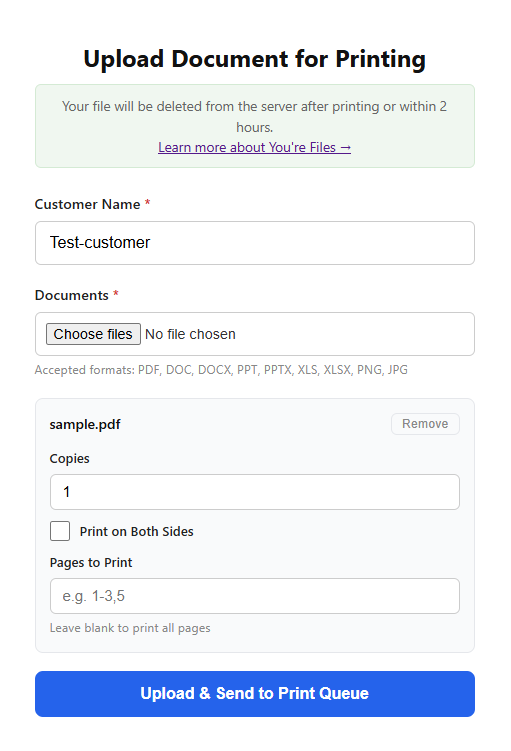
Upload your document and select print settings like copies, duplex, and page range.
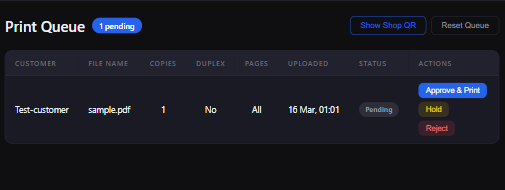
The file appears instantly in the shop's dashboard queue. The shopkeeper reviews and prints.
Every file uploaded through HandyPrintz is temporary. Documents are deleted from the server the moment they are printed. If no action is taken, a background cleanup erases them within 2 hours. There are no archives, no backup copies, and no permanent file storage.
Shops operate in isolated queues — one shop cannot see files uploaded to another. All data travels over encrypted HTTPS connections. HandyPrintz never previews, scans, or analyses the contents of your documents.
Learn more about our security measures →Built for the way print shops actually work
Stop receiving files through personal chat apps. Keep your messaging clean and professional.
Files are deleted after printing. They cannot be accessed, shared, or reprinted without the customer.
Uploaded files expire within 2 hours even if no action is taken. No manual housekeeping needed.
Every job is tracked with customer name, copies, page range, and status. No more guesswork.
No heavy software. Runs in the browser. Works on any device with an internet connection.
Upload the formats your customers use every day
Printed directly — no conversion needed
Word documents converted to PDF automatically
PowerPoint slides converted to PDF automatically
Excel sheets converted to PDF automatically
Images printed directly at native resolution
Office documents are converted to PDF on the server using LibreOffice. The original file is deleted after conversion. Maximum upload size is 50 MB.
Quick answers to what customers ask most
No. Files are deleted from the server after printing. Unattended uploads are automatically removed within 2 hours. No backups or copies are kept.
HandyPrintz does not provide a download button. The shopkeeper can only view and print the document. The file is erased once the job is completed.
If a job is rejected or encounters an error, you will see the updated status on your tracking page. You can re-upload the file and try again.
Set up your shop in minutes. Start receiving print jobs today.
Create Your Shop QR in 3 Steps